Showing posts with label Sql Server. Show all posts

Friday, July 31, 2015

SQL Complete Intelligence and Make database development fast and easy.

SQL Complete Intelligence


Now, A SQL Server developer no need to worry about the tables name or database names to remember for generating the SQL queries. Now Developer just wants to type a char and the keywords will comes up and choose appropriate keyword and can perform the tasks on SQL.

SQL Complete is free tool for developer to make life easy. No need to remember the database objects. Just type a character the all database object will comes up as pop up and choose appropriate. 
Suppose developer wants to write a insert statement for table, developer just write insert and  a space after that just table name. Apex SQL Complete the insert statement by itself.

I just used and found very useful for a developer. I don't recommend this tool for fresher because please don't use auto complete tool that will restrict your growth in terms of keywords and syntax.


How it's helpful:
  • Better than SQL Server own intelligence
  • Developer no need to write all statements.
  • Developer no need to write complete insert,update etc. statement.
  • No need to remember database objects name.
  • Create snippet for daily used query. write snippet name the query will comes up auto.
  • Can see easily the encrypted user database object as encrypted stored procedure 
  • Just write select and choose table from intelligence popup , the complete select come up
  • Select more then two table after writing select, the inner join statement automatically create. 
  • Tool is free for developer. :) 


Installation Process:

Download from AplexSQL website and run setup


accept agreement as all time we all developer accept for various application.

Specify the drive path in which you want to install sql complete.

choose your installed SSMS and VS and click Next


installation will complete on close.


Using In SQL Server Development:


After installation process just Open SSMS(SQL Server Management Studio). Found the new menu  named ApexSQL in menu bar of SSMS.


All submenu list the ApexSQL have.


 Open the query window. I just type use. A popup come up with the possible snippet and keywords.

 put a space, it automatically detect the statement and list the database names.


 Writing insert, update, stored procedure, function and trigger etc are very easy with it.
Just typed insert into and it comes up with the table name & on selecting the table name the query for insert write down automatically.


Code Structure: It show the structure of code written in query window
Write sql instruction in query window and Click code structure (Menu >>ApexSQL >>Code Structure)


Adding own code Snippet and Using:

The developer can add daily used sql code instruction as snippet code & on writting the snippet name the sql instructions will written down in sql query window.

Adding code snippet: Open the sql server query window. Right click & click for add snippet.A popup to add snippet will appear, just add snippet name ,description and the sql code and Click Ok.

Snippet "Good Morning" added on click Ok, 

Using Snippet:
Open the query window just type snippet name say good. the snippet description will comes up. Press enter. the code will be in snippet will be in your query window.


The tool is very useful for developer to speed up the daily things and increase the performance in terms of the time to require to complete a task. Developer can add numbers of snippet to it by using right click add snippet.

work smartly.

-
Sunit Kanyan
technocrats@sunitkanyan.in 

Sunday, April 19, 2015

Window Authentication login user in SQL Server

Window Authentication Login User in SQL Server

#SQL Server Security

Creating window authentication login user to access sql server database. Window authentication is termed secure as compared to sql authentication.

To add a window-authentication login to SQL server:-

  1.    Create a domain , local or group user .
  2.    Add it to sql server instance.
  3.    Add user on each database on which access require.
  4.    Add map user / assign access 

Demonstration:-

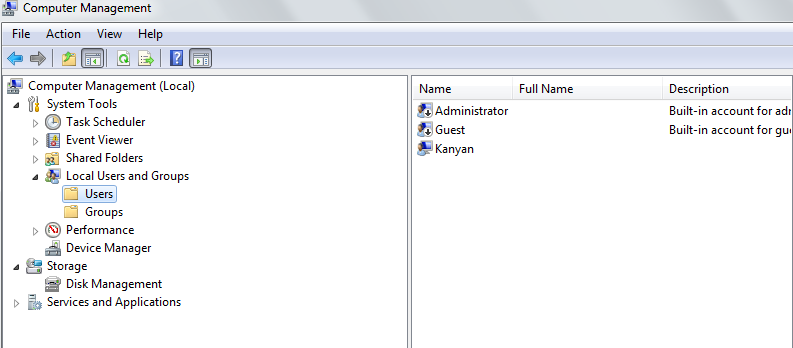
Open Computer Management (type [compmgmt.msc] in Run (window + R))
  >> System tools > Local Users and Groups 


Create new user (Right click on Users & click new user)


Created user


Open SQL Server Management Studio (SSMS):  Window+R & Type [SSMS]


Create New User


Search for window user

Change location if you wants to fetch user from domain[Active Directory(AD)].

Click on advance and Find Now


Click Ok button


Follow User Mapping to provide mapping to database for  accessing with (SunitKanyan) window user.


new user created with read only access on Database [AuditDB]


Switch user to SunitKanyan & login SQL server

.


Tried another database which does not have permission (ssms show database inaccessible).


Active directory user also used to create window authentication sql login user.

~SunitKanyan

Saturday, April 18, 2015

Sql Injection And Defense

Sql Injection

#SQL Server Security

In news ,I come to know that sql injection causes the nos of website got compromise and the detail of users got leaked. So thought come in mind to write few line on Sql injection.


What is ?

A Sql Injection attack is injection /insertion of sql query via input from application. Sql injection causes attacker can read information from database ,perform modification(insert, update, delete) in database or executive administrative related script / perform administrative task.


What it can perform ?

  •        Retrieve information/steal information.
  •        Can modify data (perform data insert,delete,update).
  •        Can effect the schema of database.
  •        Can perform database administrative task (dropping,creating database, apply some permission set on database object,create a job schedule etc  etc.)

In News ?

Demo/Example: 

These are snapshot from live website.(a marriage portal which has sql injection vulnerability) 


Now providing very basis term for sql injection for login 
Lets try userid as ' or '1'='1  and password   ' or '1'='1


Ohhh!, It's successfully logged-in


attacker can change perform number of task related to perform open even know the full information of account which is appeared after successfully log in.


Defense 

  • Avoid using dynamic Sql queries.

  • Validate each user input.(server side as well)

  • Use Prepared statement/ parameterized sql queries.

  • Use Stored Procedures.

  • Enforce least privilege.
  • Least require permission to the sql user login.


So don't trust on user input (user can be a hacker/attacker),validate each & every step of logic flow whereas this is in server side code / in sql server side stored procedure , provide only required permission. Don't give access to administrative privilege to a web user. Never use sa account to access information from db for a application.

~Sunit


Saturday, April 4, 2015

Database Snapshot


Database Snapshot


System Restore Point: In Microsoft Window Operating system , user can create a restore point just point in time. That feature allow user to revert to the status of computer system at point in time restore point created w.r.t system files, application installed, window registry and setting. 

If a developer/dba requires such thing in term of sql server database, Then Database Snapshot. 

What is it?: 
       Database snapshot is static and read only view of a database. A Database can have multiple snapshots. Database snapshot can be created on any drive partition. The Database snapshot cannot take size on disc as the Database size.
Snapshot can be used for reporting purposed. In case of user error on source database, revert the source database can be performed using snapshot in state when snapshot was created.


Reason why to take Database Snapshot?:
  • Historical Data: To generate reports based on historical data. As it record data at point in time , it is created. Suppose you require reports quarterly, monthly basis , you can create database snapshots quarterly , monthly basis and can query to generate report on that database snapshots instead on real database. i.e to investigate a department performance.
  • Mirror Database: Using Database snapshots with database mirroring permits to make the data on mirror server accessible for reporting.
  • Safeguard data against administrative error: Before doing bulk update, create a database snapshot on database. In case of any mistake done, you can use snapshot to recover by reverting the database to the snapshot. Example: Once one of my team members was performing a update on production database server, he forgot out where clause in update command that causes the whole day goes waste in reverting data using various select operation. In that time, we didn't have any database snapshot then we can revert the database and with minimal action we should be running db...We can also recover a single database object from snapshot.
  • Safeguard data against user error: Accidental attract on database such as drop table. 
  • Maintaining test database: Create a Database snapshot and perform testing of application. After successful testing do revert database, no test data will remain in database. Mostly we don't care for that case as well.

Creating Database Snapshot:

Query to generate Database Snapshot.
       

You should require enterprise Edition of Sql Server.As Soon as query execute the Database name MYBlog_04042015 will appear under Database Snapshots with its all object.
File size of the Database Snapshot be very small as comparable to the Source Database.


Dropping Database Snapshot:

Any user with DROP database permission can perform drop a database snapshot. Command is same as dropping datatabase

Drop Database [DatabaseSnapshotName]

Drop Database MYBlog_04042015

 Dropping a database snapshot deletes the database snapshot from SQL Server and deletes the sparse files that are used by the snapshot. When you drop a database snapshot, all user connections to it are terminated


Limitations:

Limitation on Source Database:

As log as a database snapshot exists, the following limitations exist on the snapshot's source database:

  • The database cannot be dropped, detached, or restored. Backup of database work normally. There is not imparting on backup of a database.
  • The Source Database must be online
  • The performance gets reduced due to increased I/O on the source db resulting from a copy on write protection. Every time a page is updated.
  • To create a database snapshot on a mirror database, the database must be in the synchronized mirroring state.

Limitation on Snapshot Database:

The following limitations apply to database snapshots:
  • A database snapshot must be created and remain on the same server instance as the source database. 
  • Snapshots are read-only.
  • Snapshots of the model, master, and tempdb databases are prohibited.
  • You cannot drop files from a database snapshot.
  • You cannot back up or restore database snapshots.
  • You cannot attach or detach database snapshots.
  • Database snapshots always work on an entire database. 
  • You cannot change any of the specifications of the database snapshot files.
  • Because database snapshots are not redundant storage, they do not protect against disk errors or other types of corruption. Taking regular backups and testing your restore plan are necessary to protect a database. If you must restore the source database to the point in time at which you created a database snapshot, implement a backup policy that enables you to do that. 
  • When a page getting updated on the source database is pushed to a snapshot, if the snapshot runs out of disk space or encounters some other error, the snapshot becomes suspect and must be deleted. 
  • You cannot create database snapshots on FAT32 file system or RAW partitions. The sparse files used by database snapshots are provided by the NTFS file system.
  • Full-text indexing is not supported on database snapshots. Full-text catalogs are not propagated from the source database. 
  • A database snapshot inherits the security constraints of its source database at the time of snapshot creation. Because snapshots are read-only, inherited permissions cannot be changed and permission changes made to the source will not be reflected in existing snapshots. 
  • A snapshot always reflects the state of filegroups at the time of snapshot creation: online filegroups remain online, and offline filegroups remain offline. For more information, see "Database Snapshots with Offline Filegroups" later in this topic.
  • If a source database becomes RECOVERY_PENDING, its database snapshots may become inaccessible. After the issue on the source database is resolved, however, its snapshots should become available again.
  • Reverting is unsupported for read-only filegroups and for compressed filegroups. Attempts to revert a database containing either of these types of filegroups fail. For more information on reverting
  • In a log shipping configuration, database snapshots can be created only on the primary database, not on a secondary database. If you switch roles between the primary server instance and a secondary server instance, you must drop all the database snapshots before you can set the primary database up as a secondary database.
  • A snapshot cannot be configured as a scalable shared database. 

Conclusion: Database Snapshots is a very good way for safeguard against administrative error , user/developer error.You can use the Database snapshot in development environment as well to track daily object changes.

~
Sunit Kan

Improve SQL Server Performance

Improve SQLServer Performance?

Performance improvements come from :- hardware , database design, and T-SQL code


1. Adding resources - RAM then followed by CPU in most environments today.(Dedicated database server.)

2. Fixing design problems before you go into production.

3. You may not know how database is going to grow and change organically over time
    -> Review your indexing.
    -> Review Statistics
     frequently and keep your data partitioned.

4. Performance tuning.


Download : Troubleshooting SQL Server

~
Sunit Kanyan

Saturday, March 14, 2015

Index and Statistics

Statistics in Sql Server

As the data and the sql query size increase , the performance of the application goes down. 

Before going though statistics Read Indexing in Sql Server

Suppose there is a procedure which evaluate the analytical report/general purpose report from database. With passes of time , the data size goes on increase so the perform of the stored procedure goes down.let initial procedure is returning record set in 4 sec , but after a time it start taking 7~10 sec . that causes the performance of application goes down. Then the application owner/org ask development team to do something good so that performance of application be good. The team think and put some indexes on the columns which are participating in where clause of the sql queries used by stored procedure . By that way the performance increase. By Creating indexing , sql server creates statistics automatically. & Queries Optimizer analyse the records from statistics. So Statistics play role in optimizing the result set generated by sql commands.

So query optimizer use the statistics to create execution plan which cause increase in performance. It represent the distribution of the data for a column of a table. If statistics are wrong or missed or outdated, then it may effect the performance of the sql query...


 Each table in database had their own statistics details.

Type of Statistics: 

There are three type of statistics:
  •  Index/Distribution Statistics: created due to index on column. Same name as Index name.
  •  Column Statistics: created due to optimizer. Name start as _WA_*
  •  Custom Statistics: created by CREATE STATISTICS command.


Statistics options

There are three options that you can be set which effect when and how the statistics are created and updated. These are set at Database level.
  • Auto_Create_Statistics
  • Auto_Update_Statistics
  • Auto_Update_Statistics_Async

When AUTO_CREATE_STATISTICS option, is ON. query optimizer automatically create the statistics for individual column in query predicate to improve the estimate for query execution.
When query optimizer creates statistics due to this option ON, it name start with _WA_.
Query to show that type of statistics
ALTER DATABASE DataeName SET AUTO_CREATE_STATISTICS ON


When AUTO_UPDATE_STATISTICS option, is ON. query optimizer automatically update statistics by determines that it's out of date. The Statistics goes out-of-date after insert or update or delete operation on the column of the table.

Query optimizer check the statistics out-of-date  before executing query from cache execution plan.
this option is apply to the statistics generated by index or by create statistics command.

ALTER DATABASE DatabaseName SET AUTO_UPDATE_STATISTICS ON

AUTO_UPDATE_STATISTICS_ASYNC option , determine whether the query optimizer uses synchronous or async statistics update. By Default this option is off(false)  & the query optimizer updates statistics synchronously.
with this option on(true), the query compile with existing statistics whether the statistics is out-of-date.

Suppose application have to execute similar queries/ cached query plans , then the response time of async statistics update predictable then sync statistics update . because optimizer no need to re-build / review query execution plan.


INCREMENTAL STATS: this option is available in SQL SERVER 2014 . IF Option ON , the statistics created as per partition , IF OFF, the statistics tree drop and re-computed

Whenever new partion of a block data added to table  , the statistics update


Conc : Statistics cause performance in queries. indexing and statistics increase the performance of select queries. For analytical, MIS reporting & general purpose reporting from an application database, the select query mostly used command , design with proper indexing and statistics

Also read Index in Sql Server http://sunitkanyan.blogspot.in/p/indexing-in-sql-server.html

~Sunit
technocrats@sunitkanyan.in